How to Automate Enterprise Workflows With AI Agents: A Practical Guide
There are two ways to automate enterprise workflows. The first is the way most organizations have been doing it for the past decade: robotic process automation, scripted rules, and brittle integrations that break every time a vendor updates their UI. The second is the way the most operationally sophisticated organizations are doing it now: AI agents that understand context, adapt to variation, and handle the exceptions that rule-based systems cannot.
The difference is not incremental. RPA works well when a process is perfectly consistent, perfectly structured, and never changes. The moment a form has a new field, a vendor changes an API response, or a document arrives in a format the script was not written for, the automation fails and a human has to step in.
AI agent automation works differently. An agent reads the document regardless of its format. It handles the new field because it understands what the field is asking for, not because it was explicitly programmed to handle that specific field. It adapts to variation the way a competent employee does - by reasoning about the situation rather than pattern-matching against a fixed script.
2026 is the year this shift from RPA to agentic automation is becoming mainstream in enterprise operations. This guide is the practical playbook for making it happen in your organization - step by step, without an ML engineering team.
Before You Start: RPA vs. AI Agent Automation
It is worth being precise about when each approach is the right tool, because AI agents are not always the answer.
RPA remains the right choice when a process is perfectly structured, completely deterministic, and unlikely to change. If you are moving fixed-format data between two systems that both have stable APIs and the process never varies, RPA is faster to deploy and cheaper to run.
AI agent automation is the right choice when the process involves unstructured data, natural language, variable inputs, judgment calls, or frequent exceptions. Contract review, employee query handling, pipeline intelligence, incident triage, report generation - these are workflows where variability is the norm, not the exception. That is where agents outperform scripts decisively.
The practical question when evaluating any workflow is: what percentage of real-world instances require a human to handle an exception? If the answer is more than 10%, RPA will not solve the problem. An AI agent will.
With that distinction clear, here is how to approach deployment.
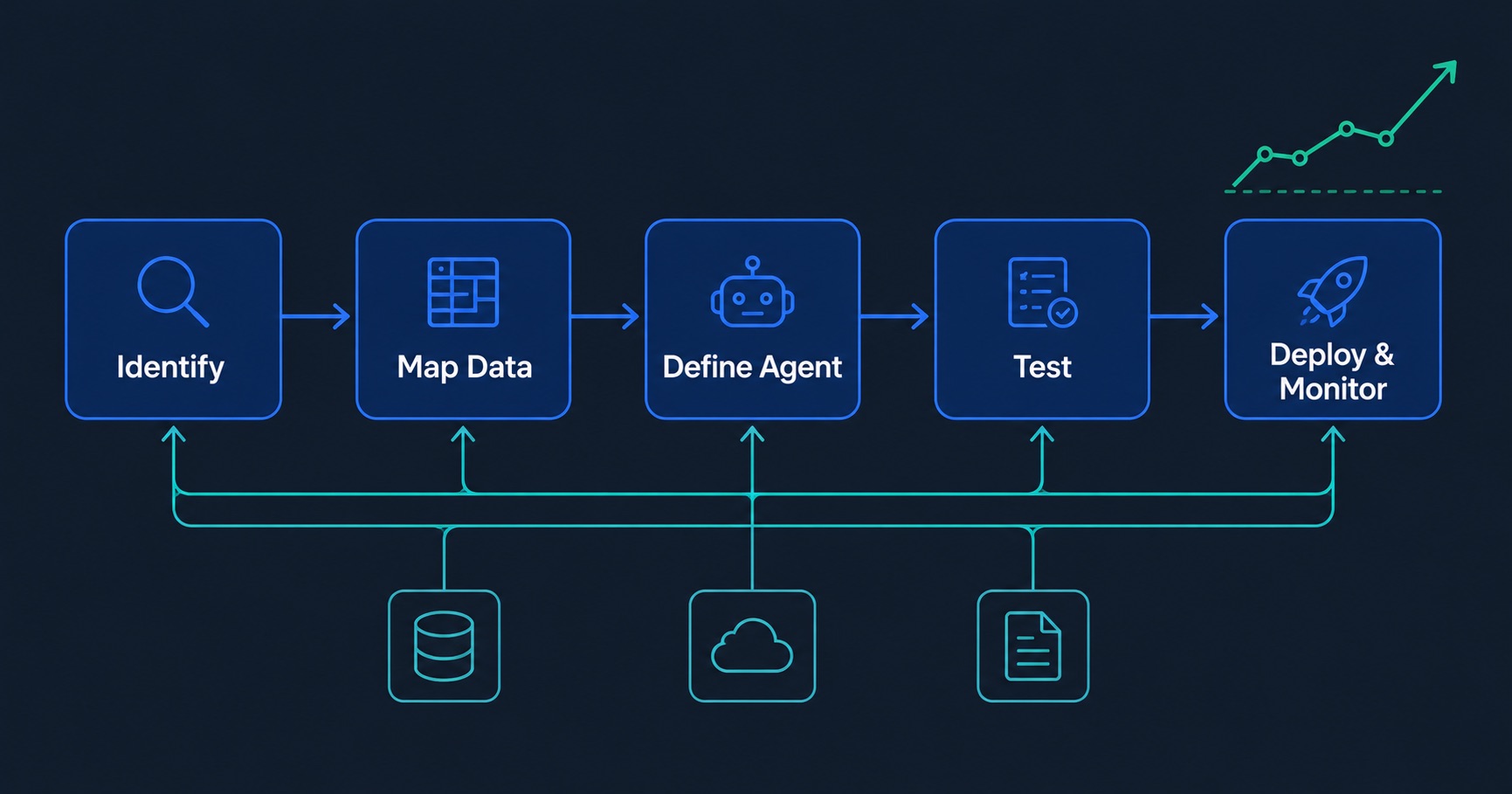
Step 1: Identify the Right Workflows to Automate First
The most common mistake in enterprise AI agent deployment is starting with the most ambitious use case rather than the most tractable one. A complex, cross-departmental workflow that touches eight systems and requires executive sign-off at multiple stages is not the right first project. A high-volume, well-understood workflow with a measurable baseline is.
Use this framework to score candidate workflows before committing engineering and business resources:
Volume: How many times does this workflow run per week or month? Higher volume means more time saved and more data to validate performance against. A workflow that runs twice a month is a poor candidate. One that runs hundreds of times a week is a strong one.
Repetitiveness: How consistent is the process across instances? A workflow where 80% of cases follow the same steps is more automatable than one where every instance is genuinely unique. Repetitiveness is not a negative quality - it is a signal that automation will work.
Data dependency: Does the workflow require pulling information from multiple systems or documents? If yes, an AI agent's ability to connect data sources and retrieve context becomes a core advantage over manual execution.
Currently manual: Is a human doing this today because it requires intelligence, or because no one has built the automation yet? The latter is the high-value target.
Measurable baseline: Can you measure how long this workflow currently takes, how often it produces errors, or how much it costs in human hours? Without a baseline, you cannot demonstrate ROI after deployment.
Score each candidate workflow across these five dimensions. The ones that score high across all five are your first projects. Resist the temptation to start with something impressive-sounding. Start with something that will produce a clear, measurable win within 60 days - that win creates the organizational momentum to do everything else.
Good first candidates across common enterprise functions:
- Weekly KPI and performance reporting pulled from multiple data sources
- Employee HR query handling for policy, benefits, and onboarding questions
- Sales pipeline exception alerts when deals show at-risk signals
- IT incident classification and routing when tickets are opened
- Invoice and purchase order matching against approved vendor lists
Poor first candidates for most organizations:
- Strategic planning support requiring significant executive judgment
- Customer-facing interactions in regulated industries before compliance review
- Workflows that depend on data sources that are not yet connected or clean
- Any process where an error has immediate, irreversible financial or legal consequences
Step 2: Map Your Data Sources
An AI agent can only act on data it can access. Before you define what an agent does, map what it needs to know and where that information currently lives.
This sounds simple. In practice, it surfaces problems that would have derailed the deployment later - access controls that prevent the agent from reading a critical database, data that exists in three different systems with no single source of truth, or a key document store that has never been indexed.
Work through this mapping exercise for each workflow you have prioritized:
What data does this workflow need to execute? List every piece of information the agent will need to do its job. For a sales pipeline intelligence agent, this might be: current deal status and activity history from Salesforce, account firmographic data from HubSpot, product usage signals from your analytics platform, and recent customer communications from Gmail.
Where does each data type currently live? Match each data type to its source system. Note the format - structured database, unstructured documents, API endpoint, file storage.
Who currently has access to each source? Map the access controls. An agent needs the same permissions a human employee would need to do this job. In most organizations, getting those permissions provisioned correctly is the longest part of the integration process. Start it early.
Is there a single source of truth, or is the same data duplicated across systems? Duplication creates conflicts. If your CRM has one version of a customer's contract value and your finance system has a different one, the agent needs a rule for which source to trust. Resolve this before deployment, not after.
A completed data map for even a moderately complex workflow will typically involve four to eight source systems. That is normal. The value of the mapping exercise is not discovering that the data situation is simple - it rarely is. The value is knowing exactly what you are dealing with before you start building.
Step 3: Define the Agent's Role, Tools, and Guardrails
This is the most consequential design decision in the entire deployment. Get it right and the agent performs reliably at scale. Get it wrong and you will spend weeks debugging behavior that looks almost right but keeps producing exceptions.
The counterintuitive insight from organizations with mature AI agent deployments is this: good agent design is more about constraints than capabilities. The temptation is to give an agent access to everything and let it figure out what to use. The result is an agent that is unpredictable and difficult to audit. The better approach is to be precise and restrictive.
Define the role narrowly. Write a one-paragraph description of exactly what this agent does, in plain language, as if you were writing a job description for a new hire. What is its primary objective? What does success look like on a typical execution? What does it absolutely not do? A sales pipeline intelligence agent monitors deal activity and surfaces at-risk signals to account executives. It does not update CRM records, send external communications, or make pricing decisions. That narrowness is a feature.
List the tools explicitly. What data sources can the agent read? What actions can it take? Be specific. "Access to Salesforce" is not a tool definition. "Read-only access to the Opportunities and Activities objects in Salesforce, filtered to deals in the current fiscal quarter" is a tool definition. The more specific the tool definition, the more predictable the agent's behavior and the easier it is to audit.
Write the guardrails before you write anything else. What should the agent do when it is uncertain? When should it stop and ask a human rather than proceeding? What outputs require human review before being sent externally? What happens if a data source is unavailable? Guardrails are not limitations on what the agent can achieve - they are the mechanism that makes it safe to deploy in a production environment with real business consequences.
A well-defined agent specification should fit on a single page. If it takes more than that, the scope is too broad. Split it into two agents.
Step 4: Build and Test in a Sandbox
Never deploy an untested agent against production data. This is the rule that gets broken most often in organizations that are excited about moving fast, and it is the one that causes the most expensive problems.
Every enterprise AI platform worth using provides a sandbox environment - an isolated deployment with test data where you can run the agent against realistic scenarios without consequences. Use it thoroughly before touching production.
Structure your testing in three phases:
Unit testing individual tool calls. Before testing the full workflow, test each tool call in isolation. Does the Salesforce query return the right data in the right format? Does the Slack message post to the correct channel with the correct formatting? Does the exception handling work when a data source returns an empty result? Each tool call should be tested against normal inputs, edge case inputs, and failure scenarios before the full workflow runs.
Integration testing the complete workflow. Run the full agent workflow end to end against a representative sample of realistic test cases - not just the happy path. Include cases where the data is incomplete, where multiple conditions are true simultaneously, where the workflow takes longer than expected, and where a downstream system is temporarily unavailable. The failure modes that matter most are the ones that look almost right - outputs that are plausible but wrong, or actions that execute but on the wrong target.
Edge case and adversarial testing. Deliberately try to break the agent. Send it inputs that are unusual, ambiguous, or outside the scope of what it was designed to handle. Does it fail gracefully? Does it escalate to a human when it should? Does it refuse to take actions outside its defined scope? An agent that handles adversarial inputs well in testing will handle the inevitable real-world surprises better after deployment.
Document everything you find in testing and fix it before go-live. An issue discovered in the sandbox takes an hour to fix. The same issue discovered in production, after it has affected real outputs, takes significantly longer and costs significantly more.
Step 5: Deploy and Monitor
Deployment is not the finish line. It is the beginning of the operational phase, which requires its own discipline.
Start with a limited rollout. Before enabling the agent for the full organization or the full data scope, run it in parallel with the existing manual process for one to two weeks. Compare the agent's outputs against what a human would have produced. Identify systematic differences. Understand whether those differences are errors or improvements. Only expand the rollout after you have validated that the outputs are reliable at the level of quality your organization requires.
Define your monitoring metrics before go-live. What does good performance look like numerically? For most enterprise workflows, the relevant metrics are: task completion rate (what percentage of workflow executions complete successfully without human intervention), error rate (what percentage produce incorrect or incomplete outputs), escalation frequency (how often the agent correctly identifies that a human needs to step in), and time saved versus the manual baseline. Measure all four from day one.
Set up alerts for anomalous behavior. Any significant change in error rate, completion rate, or execution time should trigger an alert to the team responsible for the agent. Agents can degrade silently - a data source changes its schema, a model update subtly shifts behavior, an edge case that was not in the test set starts appearing at volume. Monitoring catches this before it becomes a significant problem.
Plan your first iteration cycle. Within 30 days of go-live, schedule a structured review of the monitoring data. What are the most common failure modes? Where are humans intervening most often? What data access would make the agent more effective? The first version of any agent is a hypothesis. The monitoring data tells you what the second version should look like.
Three Real Workflow Examples
Seeing the full methodology applied to concrete workflows makes the steps above easier to translate to your own organization's context.
The Monday morning finance report
A financial operations team at a 500-person company was spending four hours every Monday assembling a KPI summary for the executive team. The process involved querying Snowflake for operational metrics, pulling pipeline and revenue data from Salesforce, calculating week-over-week variances in a spreadsheet, writing a narrative summary, and emailing the finished report by 8am.
The workflow scored high on all five prioritization criteria: high volume (weekly), highly repetitive (same structure every time), data-dependent (four source systems), currently manual (one analyst's entire Monday morning), and measurable baseline (four hours, 52 times per year).
Data mapping revealed three source systems with access already provisioned and one - a legacy accounting platform - that required a new read-only API credential. The credential was provisioned in three days.
The agent was defined with a narrow role: generate the Monday KPI report in the established format and email it to the executive distribution list by 7am. Tools: read-only access to Snowflake, Salesforce, and the accounting API. A single guardrail: if any data source is unavailable at 6am, send an alert to the finance ops team rather than proceeding with incomplete data.
After two weeks of parallel testing, the agent went live. The analyst now uses Monday mornings for the analysis and strategic commentary that the report is supposed to inform - not the assembly of the report itself.
The HR query handler
A 2,000-person manufacturing firm was fielding approximately 400 employee HR queries per month. The queries ranged from leave balance questions to onboarding checklist status to benefits enrollment deadlines. The HR team of six was spending roughly 30% of its collective time answering questions that had clear, documented answers.
The data map identified two primary sources: the Workday HR system (for employee-specific data like leave balances and onboarding status) and a SharePoint document library (for policy documents, benefits guides, and procedural documentation). Both were accessible with standard integration credentials.
The agent was defined with explicit escalation rules: any query involving a disciplinary matter, a reasonable accommodation request, a payroll discrepancy, or a complaint about a colleague routes immediately to a named HR team member with a summary of the query. Everything else is handled autonomously.
After deployment, query resolution time dropped from an average of 4.2 hours to under 2 minutes for the 73% of queries the agent handles without escalation. The HR team's allocation to query handling dropped from 30% to 8% of collective time, with the remaining 8% focused on the genuinely complex cases that benefit from human judgment.
The sales at-risk alert system
A B2B software company with 180 account executives was losing deals it should not have been losing. Post-mortems consistently showed that warning signals had been present in the CRM weeks before deals went dark - no activity logged, a champion who had stopped responding, a competitor mention in a call transcript - but no one had systematically reviewed the pipeline at that level of detail.
The agent monitors the Salesforce pipeline continuously, checking every open opportunity against six at-risk criteria: no activity in the last 14 days, no meeting scheduled in the next 21 days, decision maker contact not engaged in the last 30 days, close date passed without stage progression, a competitor mentioned in any associated note or call transcript, and deal value changed downward in the last update.
When an opportunity triggers two or more criteria simultaneously, the agent posts a structured alert directly to the account executive in Slack, with the specific signals that fired, the last activity summary, and a suggested next action based on the deal stage and account type.
The alert goes to the AE, not to their manager. This was a deliberate guardrail decision - making the alerts managerial would have changed the behavior the system was trying to encourage.
Within 90 days of deployment, the team's pipeline review process shifted from a weekly manager-led meeting reviewing every deal to AEs proactively addressing flagged deals before their managers saw them. Win rate on flagged deals improved measurably. The weekly pipeline meeting shortened by 40 minutes because the exceptions had already been addressed.
Common Failure Modes
Even well-planned deployments encounter predictable problems. Knowing them in advance lets you build defenses before they appear.
The agent tries to do too much at once. Scope creep in agent design is common. A finance reporting agent that also starts answering ad-hoc queries, updating spreadsheets, and sending Slack notifications to individual stakeholders based on its own judgment is a different system than what was specified - and a harder one to audit and trust. Keep the scope narrow. Build additional capabilities as separate agents if the need is validated.
No escalation path is defined. An agent without a clear escalation path will either fail silently or take actions it should not. Every production agent needs an explicit definition of the conditions under which it stops and hands off to a human, who that human is, and what information it should pass along when it does. This is not optional. It is the mechanism that makes autonomous agents safe to operate in environments with real consequences.
Data access is scoped too broadly. Giving an agent read access to an entire database when it only needs three tables creates audit risk and makes behavior harder to predict. Scope data access to exactly what the workflow requires. This is good security practice and good agent design practice simultaneously.
No human review loop for high-stakes outputs. Not every output an agent produces should go directly to its destination. Outputs that influence significant financial decisions, go to external parties, or affect individual employees should have a human review step before delivery - at least until the agent has demonstrated reliable performance over a meaningful sample. The review step can be lightweight: a Slack message to a responsible owner with an approve/send button. But it should exist.
The team stops monitoring after the first month. Agent performance drifts. Data sources change. Models update. Edge cases accumulate. The organizations with the most reliable AI agent deployments treat monitoring as an ongoing operational function, not a launch activity. Assign ownership. Schedule regular reviews. Treat an agent like a system, not a project.
What You Can Build Starting This Week
You do not need a six-month implementation project to get an AI agent into production. The organizations moving fastest are the ones that pick one workflow, map the data, define the agent narrowly, test in a sandbox, and deploy - in weeks, not quarters.
Pick your highest-scoring workflow from the prioritization framework above. Map the data sources it needs. Write a one-page agent specification with explicit guardrails. Build and test in a sandbox environment. Deploy with parallel monitoring for two weeks. Review the results.
That cycle - from identification to production - should take four to six weeks for a well-scoped first workflow. The second workflow takes less time because the integration infrastructure is already in place. By the sixth workflow, your organization has built the operational muscle to deploy agents as a standard practice rather than a special project.
The compounding effect of that muscle is where the real competitive advantage lives.
Ready to see this in action?
Book a 30-minute demo with the RHA OneAI team.